I want to play a game…

File under: Wrong?, What could possibly go

Send Me To Heaven (or SMTH) is a novel app for your smartphone. It is, according to the developers:

…a sport game.

In which:

Player throws his phone as high as he can. The higher the better. The phone registers the height and uploads result to leader boards. World Top 10, Week Top 10 and Day Top 10 lists are available.

But isn’t this all a bit risky? Well yes, but it’s ok – they’ve got that covered:

Hints: Be careful not to injure yourself or others. Be always aware that there is enough space above you and around you. Do some training to learn right skills to get best results.

Presumably “best results” means not breaking your phone or your fingers. Or both.

And it seems that this has happened with iPhone users, and that’s why Apple has pulled it from iStore, presumably under some sort of nanny state, user protection clause like their infamous:

Apps that include games of Russian roulette will be rejected.

Anyway, I couldn’t just post about this and not actually do it, so I actually did it.

Here are the (rather straightforward) instructions – remember: no rockets or parachutes, folks.

Screenshot_2013-08-06-15-44-20    Screenshot_2013-08-06-15-39-39    Screenshot_2013-08-06-15-39-47

And, once I’d agreed to their disclaimer, I chucked, with dreams of appearing on CTIA’s radar screens… but this was the best that I could manage (safely) with my precious Xperia T:

Screenshot_2013-08-06-16-09-36

So far, anyway…

Here’s the QR code for you Android users:

smthqr

via engadget.

When there’s only so much data to go around

Reading through a blog post by Brian Micklethwait on how an app he had just installed on his phone saved him (though I’m sure he wasn’t actually in any mortal danger at the time) when the (almost) local bus stop information board failed , I was stuck by this line:

I could not shake the feeling that my Google Nexus 4 had sucked all the information out of the sign, into itself, leaving the sign utterly confused.

Of course, that’s not how things work (as Brian well knows), and thank goodness. Dissemination of information simply wouldn’t work if there was a finite number of times that any data could be displayed or shared simultaneously.

Twitter would be instantly useless, the most popular pages on the internet (like this one) would have no impact whatsoever and we’d stop getting those “Like = 1 prayer” posts on Facebook.

So not all bad then.

Little tablets. Why?

I had my first hands on experience with an Apple iPad mini yesterday. Cute little thing, neat and tidy too (as you might expect), but I’m still struggling to get my head around why anyone would want to have a mini tablet. Each to their own of course, and my own isn’t Apple, wherever it can be avoided. But Android has its fair share of these mini tablets too and they leave me equally mystified.

Why would you want a device which looks like your phone, is ever so slightly bigger than your phone, but doesn’t make phone calls?

My phone is great, I love it, but the only place it falls down is that the screen isn’t big enough to do “some stuff” on – well, do some stuff easily anyway. Stuff like spreadsheets, documents and the like. Looking at pictures in detail as well. You’d just rather see more bits at the same time.

Of course, these mini-tablets are bigger than my phone. But they’re not very much bigger and it’s still awkward to do these things.
It’s at this point that I don’t get it. Why not just go for a 10 inch screen instead of a 7 or 8 inch one? Yes, it’s bigger and heavier – “more cumbersome” if you want to use negative flowery language – but it’s not like your iPad mini fits in your pocket anyway, is it? Unless you have really big pockets, in which case normal rules obviously don’t apply to you anyway.

The benefits of the larger screen far outweigh its cumbersomeitude. It’s more practical, it’s more versatile, it’s just… better.

I am sure that my “not getting it” will prompt a flurry of indignant cries of “you don’t get it”, and they’d be right. Because I don’t get it. So won’t somebody please explain the vast array of benefits of the mini tablet?
It probably won’t sway me, but it might help me understand why this is such a fast growing market at the moment.

I do hope it’s not just that usual Apple thing of being cool over being functional. That would be terrible.

More apps

If you managed to read my recent post about the Android 4.1.2 software update on my sexy Sony Xperia T, then you know how much I’m enjoying this phone. I’m not sure how I would ever manage without it, both for my productivity and entertainment needs. And thus, I’m sharing a few more things to make your Android-based lives a little better.

Partypoker
These people got in touch and paid me some money to review their game.
Partypoker is a third party application that you can download for free from www.partypoker.com: a gaming site offering a good selection of poker games online.
Once you’ve installed the app, you can start playing the No Limit Texas Hold ‘Em, Omaha Hi/Lo, 7-Card Stud Poker, or even the Classic Roulette. Aside from killing your boredom, the app also provides an online community where you can chat with players of the same skill level. Useful for me, cos I’m a newbie to this kind of thing.
To fully enjoy the service, you must have an excellent data connection (yes, I know , SA) or Wi-Fi. But even though the Xperia T isn’t LTE-capable, the virtual poker room runs smoothly on a 3G network too.
Through Partypoker, I have learned that I am not very good at poker.

Fotmob
I’ve covered this before, but for football lovers like me and you, this comprehensive football application is a must-have. Try it free here first before you (almost immediately) decide that you want to upgrade to the paid version.
It features all the English leagues, SA’s own PSL, La Liga, Ligue 1, Champions League, World Cup Qualifiers, Bundesliga and many more. From here you can access latest scores, statistics, breaking news, commentaries, videos, squad lists and detailed info on players’ background.
It also features live push notifications to your home screen for your favourite clubs. Which is great. When they’re winning.

Layar
A very helpful application that I’ve had a lot of fun using in Cape Town. Basically, it uses your mobile phone’s GPS to locate the nearest businesses or establishments that you  might be looking for. It was basic when I first saw it back in 2010. Now, it’s incredible.
The best feature of Layar is the augmented reality camera, meaning that you can just point your phone’s camera at any given street scene and see information all over the place. It’s like the future, but now.
You can search for nearby petrol stations (particularly useful when your wife forgets to fill up before a trip to Langebaan), restaurants, cafés and hotels (in case you find yourself in sudden need of a nearby hotel) (*cough*).
With its customisable search function, you can also narrow your choices by grouping restaurants according to price, distance or visitor reviews. Aside from providing you with a map and navigation, you can also make reservations in just a few taps. It’s amazing.
ARE YOU WATCHING, MARTY MCFLY?!?!?

Now: Go Home

Since the latest software upgrade on my gorgeous Sony Xperia T, I have been treated to Google Now each time I use the search bar.
It’s a fairly amazing feature – it detects where I am, what’s around me and uses information I have searched for previously to work out what information might help me… well… now. It then displays that information on little ‘cards’ before I’ve even asked for it.
Now is wow.

Thus, I am treated to weather information, local restaurant reviews, even local news. It keeps me up to date with the latest on Sheffield United. It reads my next calendar appointment and offers directions. If I book a flight, it’ll keep me informed of delays, gate numbers, seat numbers and issue a digital boarding card. If I’m at a train station, details of the next trains to pass through will be displayed.

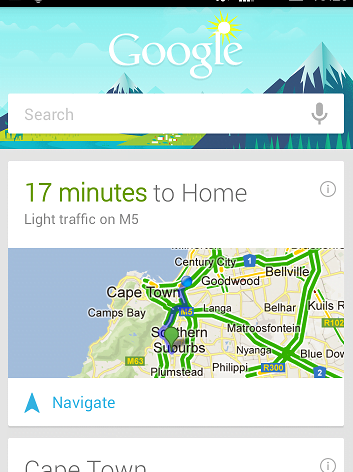
But I’m not often at train stations, so mainly, it just tells me how long it’s going to take for me to get home.

Screenshot_2013-04-16-13-29-27

Yep. Wherever I go, once I have been stationary for about 5 minutes, Now thinks I’ve probably had enough already and tells me how long it’s going to take me to get home. Tap that little blue arrowhead and it’ll even talk me through it turn by turn. Right now, in the middle of the day, things are looking pretty cool for a quick trip back to Chez 6000. Sadly, I have plenty more to do here before I set off.

This could be seen as all somewhat sinister since I’ve never actually told my phone where I live. It has worked that out for itself. It also now knows where I work and warns me of traffic issues along the way as soon as I set off from home each morning. Again, I’ve never actually told it where I work either. The Sheffield United thing was also a bit of a surprise when it first popped up. It’s ever so clever.

The more paranoid among you will now be wailing and gnashing your teeth over privacy concerns, and if I was a secret agent then I too would be wailing and gnashing (quietly though, so as not to attract attention). But I’m not.

And it’s actually rather comforting to constantly know how long it’s going to take me to get home.